Codeshares, wet leases, and operating carriers: reading who really flies
The flight number you book isn't always the airline that flies you. Here's the difference between marketing and operating carriers, codeshares, and wet/dry leases — and how it all shows up in the schedule.
Book a flight marked “QF” and you might board an aircraft painted in another airline’s
colours, flown by another airline’s crew. That isn’t a mistake — it’s how the modern
network works. Understanding the difference between who sells a flight and who flies
it is essential to reading a schedule correctly, because the two aren’t always the
same airline.
Marketing vs operating carrier
Two roles hide behind every flight:
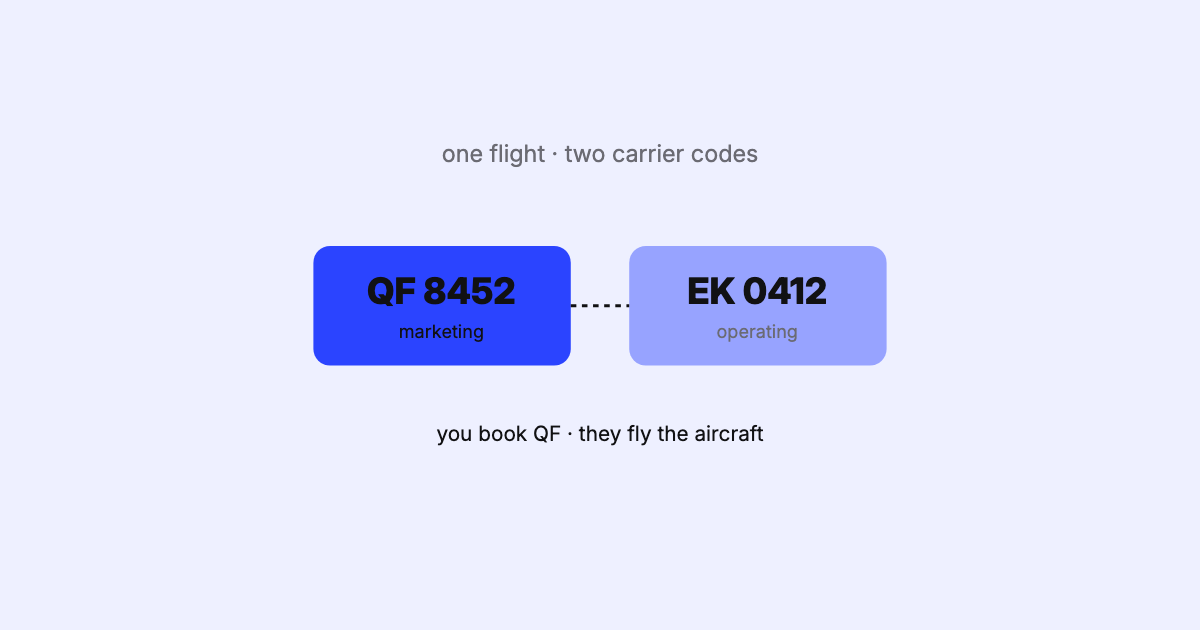
The marketing carrier is the airline whose code and flight number are on your
ticket — the airline you booked with.
The operating carrier is the airline that actually flies the aircraft — its
metal, its crew, its operating certificate.
On a plain flight, they’re the same airline. On a codeshare, they differ.
One aircraft in the air; two airline codes attached to it. The schedule has to represent both.
Codeshares
A codeshare is a commercial agreement in which two or more airlines sell the same
physical flight under their own flight numbers. It lets a carrier offer a destination
it doesn’t fly itself — feeding traffic across a partnership or alliance — without
putting an aircraft there. The operating carrier flies once; several marketing
carriers may sell it, each under its own code.
In the SSIM schedule, the operating flight is a flight-leg
record (type 3); the codeshare marketing
designators travel as segment-level data (type 4 DEIs) attached to that leg. Read
the leg and you know who flies; read the segment data and you know who else is selling
it. Miss the segment data and a schedule looks complete but hides half the commercial
picture.
Wet, damp, and dry leases
Leasing is the other reason the airline on the aircraft may not be the one you expect.
The distinction is about what comes with the aircraft:
Lease
What’s included
Crew provided by
Typical term
Wet (ACMI)
Aircraft, Crew, Maintenance, Insurance
Lessor
~1–24 months
Damp
Aircraft + cockpit crew (not cabin)
Mixed
Short-term
Dry
Aircraft only
Lessee (on its own AOC)
~2 years+
Under a wet lease (ACMI), one airline supplies a fully crewed, maintained, insured
aircraft to another and is paid by the hours operated — common for covering seasonal
peaks, delivery gaps, or disruptions. Under a dry lease, only the airframe changes
hands; the lessee puts it on its own operating certificate and flies it with its own
crew. (A codeshare and a wet lease are not the same thing — one is about selling
another airline’s flight; the other is about getting access to more aircraft.)
Why it matters for schedule data
This isn’t trivia. Getting the operating-versus-marketing relationship right drives
real outcomes:
Duty of care and disruption. When a flight is delayed or cancelled, the operating
carrier’s operation is affected, but the passenger’s relationship is with the
marketing carrier. Systems on both sides need to know which is which.
Commercial correctness. Selling a codeshare you don’t have, or failing to show
one you do, is lost revenue or an unfulfillable booking.
Analysis and capacity. Count both the marketing and operating numbers as separate
flights and you’ll double-count capacity; ignore the codeshares and you’ll
under-count the commercial network. You have to know which question you’re asking.
The schedule doesn’t just say when a flight operates. It says who operates it and
who’s allowed to sell it — and those are three different facts that have to line up.
Doing it well
Reading a schedule correctly means keeping the operating leg and its codeshare segment
data together, distinguishing marketing from operating flights, and not conflating them
when you count or compare. That’s exactly the kind of fidelity SSIM Toolkit is built
for: parse the record types faithfully, keep the
segment data attached to the right leg, and let you see — clearly and locally — who
flies and who sells, without a home-grown script guessing at it.
Next: SSM and ASM — how changes to all of this
travel between systems.