


SSIM service type codes: what J, C, F and P mean
The one-letter service type on every SSIM flight leg says what kind of flight it is. What the codes mean, how to group them, and the traps when filtering.
How SSIM names a flight leg: airline, flight number, itinerary variation and leg sequence. How variations are numbered, the overflow byte, and multi-leg dates.
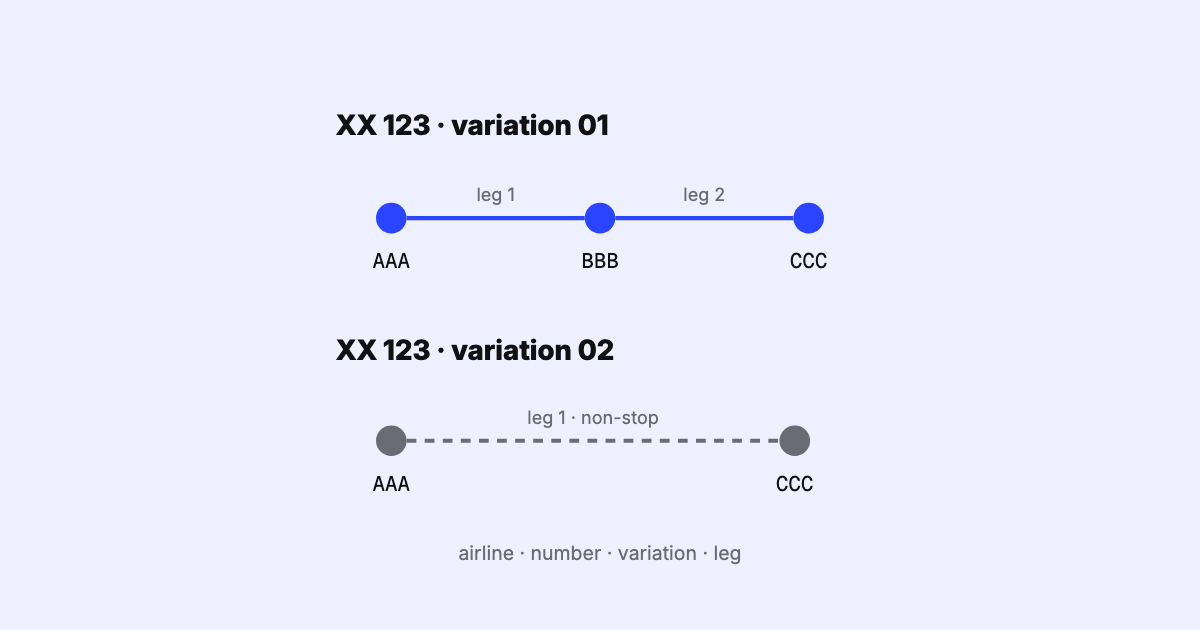
In an SSIM file, a flight number on its own does not identify anything. The same number can fly different aircraft in spring and autumn, a different routing on Sundays, and two or three stops on the way. SSIM tells these apart with two small fields on every flight leg record:
01, 02, … in order of the dates each version starts, and01 for the first leg,
02 for the next, and so on.A leg is therefore identified by airline + flight number + itinerary variation + leg sequence (plus the operational suffix, when there is one). Key your data on flight number and leg alone and different versions of the flight collide; key it on the variation’s two digits alone and you will eventually merge variation 7 with variation 107.
SSIM’s idea of an itinerary is precise: one flight, or a series of identical flights, over a continuous period on the same days of operation, made of one or more legs that join up into a complete routing. When something differs on some of the dates or days — the routing, the aircraft type, the cabin configuration, the times — those dates form a separate itinerary, and it gets its own variation number.
Each variation describes its whole routing, starting from leg 01. A variation that holds
only leg 02 leaves a reader unable to tell where the flight started, so SSIM treats it as
wrong. If one day of the week has a different routing, that day gets its own variation with all
of its legs, even the ones it shares with the other days.
Here is an illustrative two-leg flight — an invented airline XX, flight 456, Singapore to London
via Dubai, four days a week. In July the aircraft type changes, so the summer season is filed as
two variations, each with its two legs:
| Variation | Leg | Route | Period | Days | Aircraft |
|---|---|---|---|---|---|
| 01 | 01 | SIN–DXB | 29 Mar – 29 Jun | Mon Wed Fri Sun | 359 |
| 01 | 02 | DXB–LHR | 30 Mar – 30 Jun | Mon Tue Thu Sat | 359 |
| 02 | 01 | SIN–DXB | 1 Jul – 23 Oct | Mon Wed Fri Sun | 77W |
| 02 | 02 | DXB–LHR | 2 Jul – 24 Oct | Mon Tue Thu Sat | 77W |
Three things in that table are worth slowing down for.
Variation 01 is the one that starts first. SSIM numbers variations by their effective date:
the earliest start gets 01, the next 02. When two start on the same day, the one that ends
first gets the lower number.
The second leg has different dates and days. The flight leaves Singapore at 23:35 and the
second leg leaves Dubai at 04:35 the next morning. In SSIM the period and days of operation
belong to each leg’s own departure, so leg 02 is shifted by a day: its period starts on 30
March, and every operating day moves one along — Monday becomes Tuesday, Sunday becomes Monday.
That shift is required even when it pushes a downline leg’s last date past the end of the season
or the airline’s stated validity.
The date variation ties the legs back to one flight. The two characters at the end say, for
departure and then arrival, how many days after the flight’s date at its origin each event falls.
Leg 01 departs on the origin date and lands the next day: 01. Leg 02 departs and lands one
day after the origin date: 11. A 0 means the same day, 1 the next, 2 two days later,
and A the day before — which, in local time, happens when a flight crosses the date line
eastbound.
Two digits allow 99 variations per flight number, and a busy flight with many seasonal tweaks,
aircraft swaps and one-off dates can run past that. SSIM handles it with a separate itinerary
variation overflow that holds the number of hundreds to add. Variation field 07 with overflow 1 is variation 107.
When the true number is a round hundred, the two-digit field reads 00. Below 100 the overflow
byte is blank.
This is one of the easiest fields in the format to drop. It sits far from the variation number, it is blank on almost every record, and a parser that never reads it works perfectly until the day a flight needs variation 100 — at which point two different versions of the flight quietly become one.
A record can carry an operational suffix, a single letter the airline assigns for
its own purposes. SSIM recommends Z for one specific job: telling apart two flights that end up
with the same number on the same UTC date. Two rules follow:
XX456 and XX456Z share one sequence
of variation numbers; a suffixed one-off is simply the next variation.Segment data records (record type 4) carry a leg’s code shares, traffic restrictions and other data elements. Each one repeats the identity of the flight leg it belongs to — suffix, airline, flight number, variation, leg sequence, service type — and it should follow that leg directly in the file. The overflow, again, sits apart — so the repeated identity alone does not always pin down the leg.
SSIM asks for flight legs in flight designator order, then by variation, then by leg sequence,
with each leg’s segment records straight after it. Not every producer follows that, and some
files start a variation’s legs at a number other than 01 — a real-world quirk worth flagging
rather than repairing silently, since a reader cannot know which leg is missing.
01’s dates puts it on the wrong day.What is an itinerary variation identifier?
A two-digit number (01–99, extended by an overflow digit) that tells apart the different
versions of one flight number — different dates, days, routing, aircraft or configuration.
What is the leg sequence number?
The position of a leg within its itinerary variation: 01 for the first hop, 02 for the second.
Does a new aircraft type need a new variation? Yes, if it changes part way through the period. A variation is one continuous period with the same details throughout.
Why does leg 02 have different dates from leg 01? Because each leg’s dates are its own departure dates. A leg that departs after midnight is dated the next day.
SSIM Toolkit reads a leg’s identity in full — airline, number, the complete variation including its overflow, and leg — keeps every segment record attached to its leg, and validates the variations and leg sequences as it reads. It runs on your own machine, and the product page shows the rest.
Sources
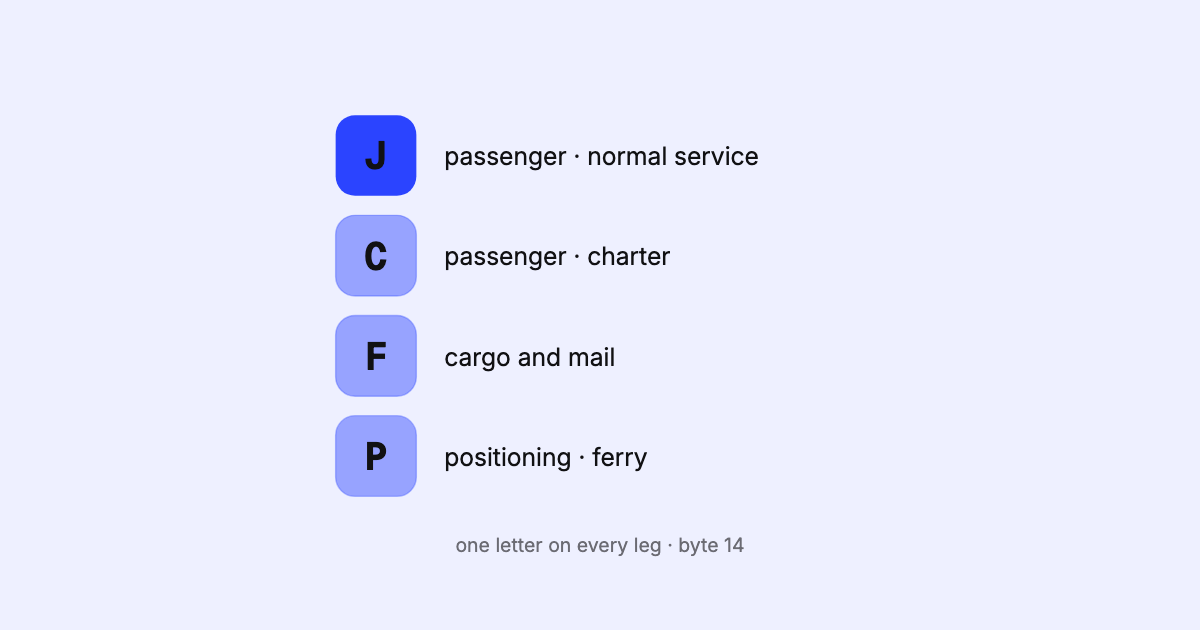
The one-letter service type on every SSIM flight leg says what kind of flight it is. What the codes mean, how to group them, and the traps when filtering.
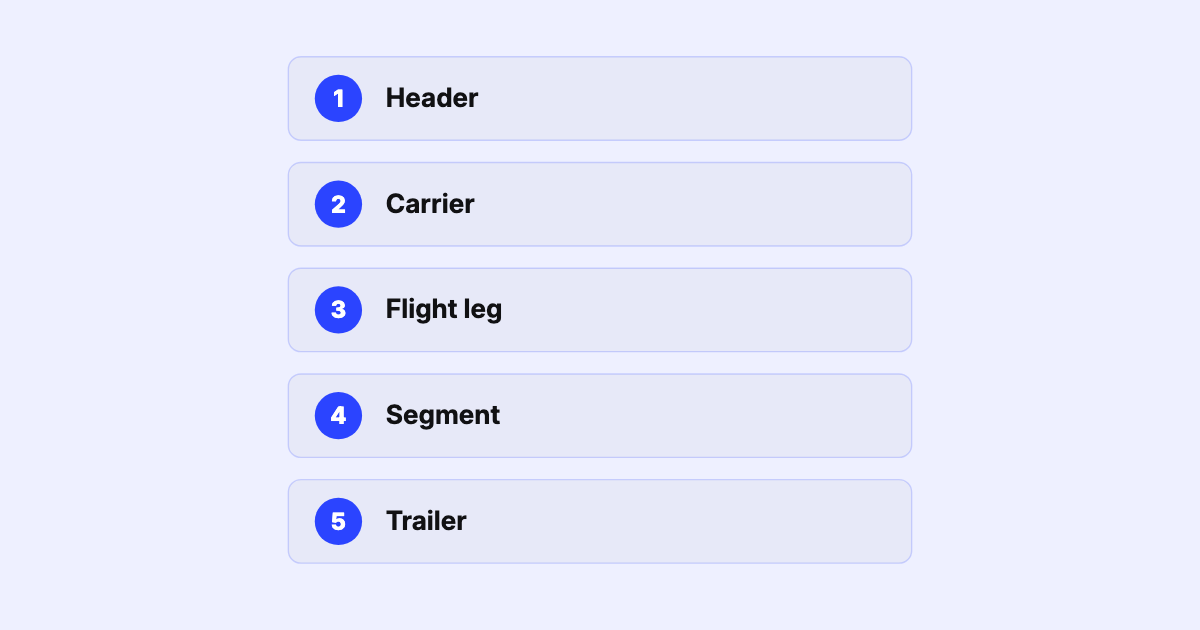
A field-level walk through the SSIM record types — header, carrier, flight leg, segment data, and trailer — with a sample file, the fields that matter, and the gotchas that bite parsers.
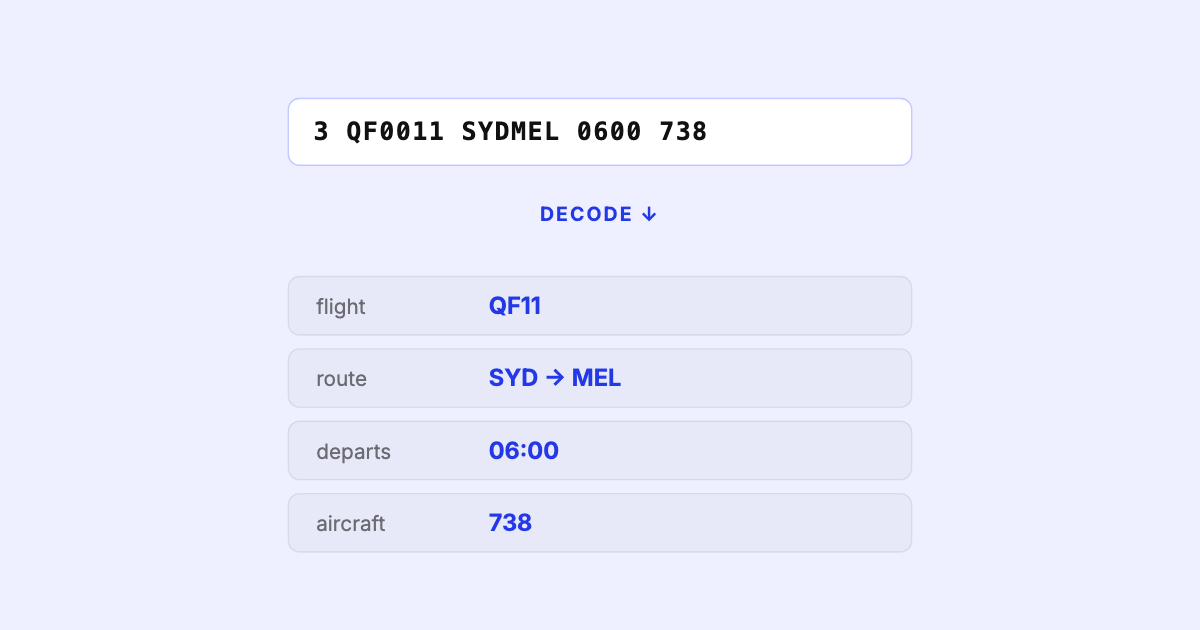
SSIM is how the airline industry exchanges its schedules — a fixed-width, 200-byte text format that's deceptively simple and genuinely hard to get right. Here's what it is and why it matters.